
Web development is often reduced to writing code. But building a modern website involves much more than making pages appear in a browser.
A successful website combines business strategy, user experience (UX), visual design, functionality, content, performance, and continuous improvement.
Think about the last website you used to book an appointment, purchase a product, or contact a business. Behind that seemingly simple experience are several connected systems working together.
The navigation helps you find information. The interface makes interaction possible. The underlying technology processes your requests. And the content gives you a reason to take action.
That is what modern web development brings together.
Whether you’re launching a startup, improving an existing website, hiring developers, or exploring a career in technology, understanding web development helps you make more informed decisions.
The process can be summarized as:
Plan → Design → Build → Test → Launch → Improve
Let’s explore how it works, the technologies involved, the skills developers need, and what makes a website genuinely useful.
What Is Web Development?
Web development is the process of planning, building, testing, launching, maintaining, and improving websites and web applications. It involves creating user-facing interfaces, developing server-side functionality, managing data, integrating software, and optimizing performance, security, and accessibility to deliver reliable digital experiences that meet user needs and business goals.
In simpler terms, web development turns a digital idea into something people can access and interact with through a browser.
It can involve creating a five-page company website, developing an online store, or building a complex software platform with thousands of users.
Depending on the project, developers work with:
- Front-end technology: Creates the interface visitors see and use.
- Back-end technology: Handles server-side functionality, data, and application logic.
- Databases: Store and organize application information.
- APIs: Connect separate software systems.
- Content management systems: Allow businesses to manage website content.
- Performance and security tools: Support reliable operation.
- Testing and maintenance: Help keep the experience functional over time.
The objective is not simply to produce working code. It is to deliver a functional digital experience that serves a defined purpose.
Business Goals + UX + Design + Technology + Content + Performance = Modern Web Development
How Does a Website Work?
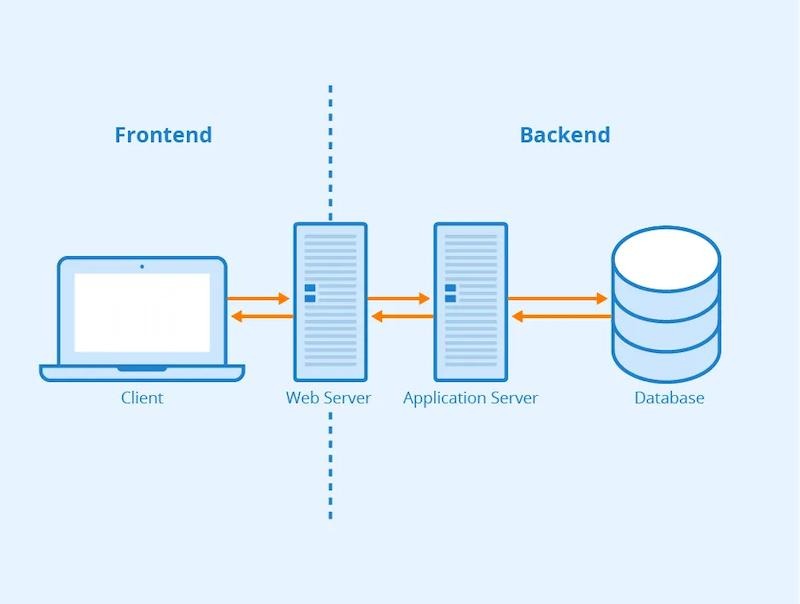
When someone opens a website, their browser communicates with systems that provide the requested content.
The process happens through a series of requests and responses.
Understanding the Browser, Server, and Database
A browser is software, such as Chrome, Firefox, or Safari, that retrieves and displays web content.
The browser acts as a client. A server provides resources or executes application logic in response to requests.
A database stores structured information that an application may need, such as products, account records, or blog content.
A typical request works like this:
User opens a page
↓
Browser sends a request
↓
Server receives the request
↓
Application retrieves data if required
↓
Server sends a response
↓
Browser renders the experience
Not every page requires a database request. Some websites deliver prepared HTML files directly, while others generate content dynamically.
What Are Domains, DNS, and Hosting?
Three additional concepts help explain how websites become available online.
- Domain: The human-readable website address, such as example.com.
- DNS (Domain Name System): Helps translate domain names into information needed to reach the appropriate infrastructure.
- Web hosting: Provides the infrastructure that makes website files or applications accessible online.
Together, these technologies help connect visitors to the website they want to use.
For a beginner-friendly technical explanation, Mozilla’s MDN guide to how the web works explains the client-server relationship.
Website vs. Web Application: What’s the Difference?
Although the terms are sometimes used interchangeably, websites and web applications usually have different primary purposes.
A website commonly focuses on publishing information, introducing a brand, presenting products or services, and helping visitors discover content.
A web application places greater emphasis on interaction, personalized workflows, accounts, transactions, and data processing.
| Feature | Website | Web Application |
| Primary purpose | Information, marketing, communication | Interactive functionality and workflows |
| User interaction | Often content-focused | Often highly interactive |
| User accounts | Optional | Common |
| Data processing | Limited to extensive | Frequently central |
| Examples | Blogs, portfolios, company websites | SaaS tools, dashboards, portals |
| Development complexity | Simple to complex | Simple to complex |
For example, a law firm’s website might explain its services and collect inquiries through a contact form.
A project management application might allow users to create tasks, assign responsibilities, set deadlines, and collaborate.
The distinction is not absolute. An ecommerce website can also function as a sophisticated web application.
What matters is understanding what users need to accomplish.
What Are the Different Types of Web Development?
The three main types of web development are front-end development, back-end development, and full-stack development.
Each focuses on a different part of the digital experience.
1. Front-End Development
Front end web development focuses on the parts of a website that people see and interact with inside their browsers.
This includes:
- Page layouts and visual elements
- Navigation menus and buttons
- Forms and interactive components
- Responsive layouts
- Animations and transitions
- Browser compatibility
- Interface accessibility
Front-end developers primarily use HTML, CSS, and JavaScript.
HTML → Structure
CSS → Presentation
JavaScript → Behavior and Interaction
Imagine a restaurant website.
HTML defines the headings, menu sections, and booking form. CSS controls the colors, spacing, typography, and layout. JavaScript can provide interactive features such as form validation or dynamically updating a reservation interface.
TypeScript, which adds a type system to JavaScript, is also used in many front-end projects.
Good front-end development ensures the website is not only visually appealing but usable across devices and input methods.
2. Back-End Development
Back-end development handles the systems behind the visible interface.
When someone logs into an account, submits an order, or retrieves personalized information, back-end systems often process those actions.
Back-end development may involve:
- Server-side programming
- Application logic
- Database operations
- Authentication and authorization
- API development
- Payment processing
- Third-party integrations
- Security and data validation
Consider an ecommerce checkout.
When a customer places an order, the server may validate the request, coordinate payment processing, save order information, and initiate confirmation messages.
A simplified workflow is:
User Request → Server → Application Logic → Database / API → Response → Browser
Common back-end technologies include Python, PHP, JavaScript with Node.js, Java, C#, Ruby, and Go.
3. Full-Stack Development
Full stack web development combines front-end and back-end responsibilities.
Front End + Back End = Full-Stack Development
A full-stack developer may build a website’s interface, create server-side functionality, connect databases, and integrate external services.
This makes full-stack skills useful for building products end to end.
However, complex web development projects may still require specialists in UX research, UI design, security, DevOps, technical SEO, accessibility, and quality assurance.
Full-stack expertise does not automatically replace every role on a multidisciplinary team.
Front End vs. Back End vs. Full Stack
| Area | Front End | Back End | Full Stack |
| Main focus | User interface | Server, logic, and data | Both |
| Primary environment | Browser | Server environment | Browser and server |
| Technologies | HTML, CSS, JavaScript | Server languages, APIs, databases | Combination |
| Responsibilities | Interaction and responsiveness | Data handling and functionality | End-to-end delivery |
| Key concern | Usability | Reliability and secure processing | Integration across systems |
These disciplines depend on one another.
A visually polished interface cannot complete a transaction without the necessary functionality. Likewise, a powerful back-end system provides little value if people struggle to use its interface.
Web Design vs. Web Development
Web design and web development are closely related, but they emphasize different responsibilities.
Web design focuses on how an experience is organized, presented, and communicated.
It includes typography, color, visual hierarchy, wireframes, prototypes, and interface design.
Web development focuses on implementing the experience through technical systems.
It includes coding, application functionality, databases, APIs, deployment, and maintenance.
| Web Design | Web Development |
| Visual direction | Technical implementation |
| Wireframes and prototypes | Functional interfaces |
| Typography and layout | HTML, CSS, and programming |
| Brand expression | Application functionality |
| Interaction planning | Interaction implementation |
Both disciplines contribute to UX.
Designers consider user needs and interface behavior, while developers make decisions affecting usability, accessibility, responsiveness, and performance.
Strategy + UX + Design + Development = Modern Website Delivery
The strongest results come from collaboration rather than treating design and development as disconnected stages.
What Does a Web Developer Do?
A web developer builds, maintains, and improves the technical parts of websites and web applications.
Responsibilities vary by specialization, but common tasks include translating designs into working interfaces, developing features, connecting databases, integrating APIs, diagnosing bugs, testing functionality, and deploying updates.
Developers also collaborate with designers, project managers, content teams, and marketers to ensure the finished product meets its requirements.
For example, a marketing team may need a landing page that captures leads.
The developer implements the page, connects the form to the required systems, ensures the interface works across devices, and supports accurate conversion tracking.
The work is both technical and problem-solving-oriented.
What Skills Are Needed for Web Development?
Web developers need a combination of technical abilities, interface understanding, problem-solving skills, and collaboration.
Technical Skills
Important technical foundations include:
- HTML, CSS, and JavaScript
- Programming fundamentals
- Responsive development
- APIs and HTTP concepts
- Database fundamentals
- Git and version control
- Debugging and browser developer tools
- Testing and quality assurance
- Basic application security
- Deployment and hosting concepts
UX and Interface Skills
Developers benefit from understanding navigation, usability, accessible components, responsive layouts, and user flows.
A working interface is not necessarily an intuitive interface.
Problem-Solving Skills
Development involves breaking complicated requirements into manageable tasks, investigating errors, and evaluating alternative implementations.
Logical thinking and the ability to debug unfamiliar behavior are particularly valuable.
Communication and Collaboration
Developers must also explain technical decisions, document work, clarify requirements, and coordinate with other specialists.
The exact skills depend on the role. Front-end developers, back-end developers, and DevOps engineers do not require identical expertise.
What Programming Languages Are Used in Web Development?
Different technologies solve different problems.
Core Front-End Technologies
| Technology | Main purpose |
| HTML | Structures page content |
| CSS | Controls presentation and layouts |
| JavaScript | Adds programmable browser functionality |
| TypeScript | Adds static type checking to JavaScript |
HTML is a markup language, and CSS is a stylesheet language. They are foundational web technologies rather than general-purpose programming languages in the same sense as JavaScript or Python.
Common Back-End Technologies
- JavaScript / Node.js: JavaScript-based server development.
- Python: Server-side applications, integrations, and data-related systems.
- PHP: Server-side development, including many CMS applications.
- Java: Web applications and enterprise systems.
- C#: Applications commonly developed within the .NET ecosystem.
- Ruby: Server-side applications, including those using Rails.
- Go: Networked services and back-end applications.
No language is universally best.
A suitable choice depends on the application requirements, existing infrastructure, team expertise, maintainability, integration needs, and expected scale.
What Are Frameworks and Libraries?
A library provides reusable functionality that developers can incorporate into an application.
A framework provides conventions or structures for building and organizing applications.
Common examples include React, Vue, Angular, Next.js, Django, Laravel, and Ruby on Rails.
React is primarily a user-interface library. Next.js is a React framework, while Django and Laravel are server-side web frameworks.
Node.js is a JavaScript runtime, not itself a framework.
For business owners, the important relationship is:
Programming Language → Framework or Library → Application Architecture
The technology stack should support the project rather than dictate its goals.
What Is Python Web Development?
Python web development involves using the Python programming language to build server-side website functionality and web applications.
Developers may use frameworks such as:
- Django: Provides an integrated approach to developing database-driven applications.
- Flask: Offers a lightweight foundation for building web applications and APIs.
Python can be particularly relevant when a web application needs to work alongside existing Python-based automation, data processing, or AI-related systems.
For example, a reporting platform might use Python services to process data and deliver results through a browser-based dashboard.
Python is one option among many. Its suitability depends on project requirements, architecture, and development expertise.
What Are the Stages of Web Development?
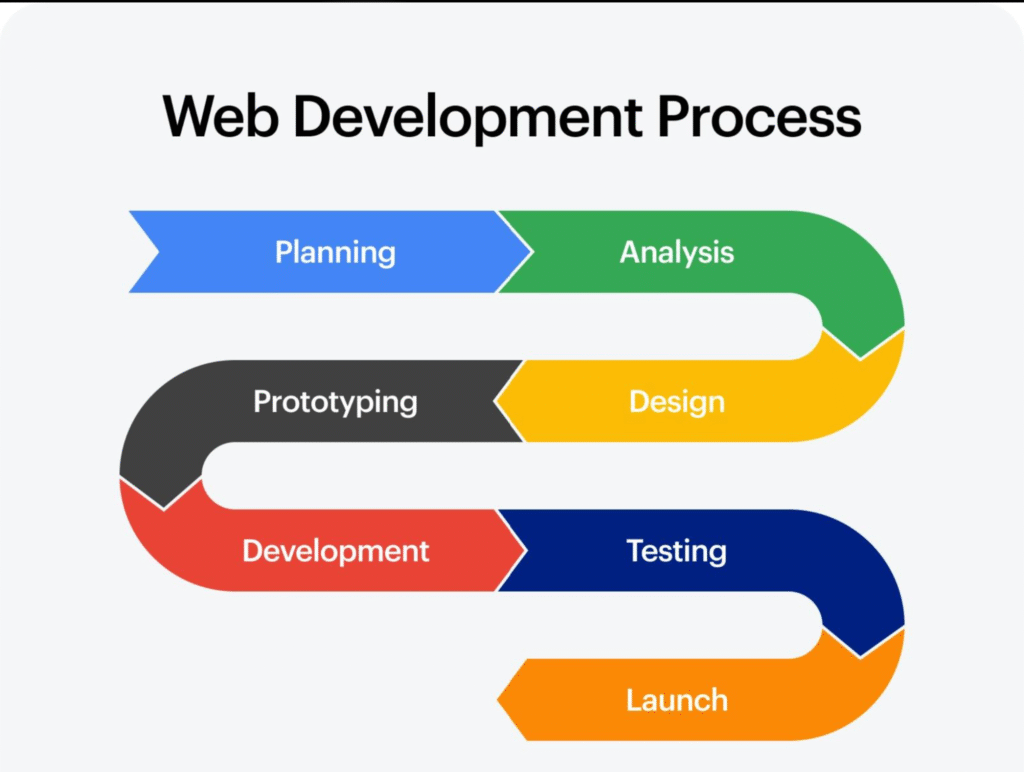
A professional web development process usually includes discovery, planning, design, development, testing, deployment, maintenance, and optimization.
The exact sequence may vary, and iterative projects often revisit earlier stages.
1. Discovery and Research
The project begins by understanding the business, target audience, competitors, and desired outcomes.
Questions include: Who will use this website? What problems must it solve? Which actions matter most?
2. Requirements and Scope
The team defines the required features, content, integrations, technical constraints, responsibilities, and delivery milestones.
Clear scope reduces misunderstandings and helps manage changes.
3. Information Architecture
Information architecture organizes content into a logical structure.
This includes page hierarchy, sitemaps, navigation, and relationships between pages.
4. UX Planning
UX specialists map user journeys and develop wireframes or interaction flows.
The goal is to make important tasks clear and manageable.
5. UI and Visual Design
The interface takes shape through layouts, components, typography, colors, imagery, and brand elements.
Prototypes may be used to validate important interactions before development.
6. Front-End and Back-End Development
Developers build interfaces, configure application logic, connect databases, establish CMS functionality, and integrate external systems.
The technical implementation depends on the agreed requirements.
7. Content Integration
Copy, images, videos, product information, landing pages, and SEO content are added.
Content should be considered throughout the project, not only after design is complete.
8. Testing and Quality Assurance
The team checks functionality, accessibility, responsive behavior, browser compatibility, forms, integrations, and performance.
Defects are addressed before approval.
9. Deployment and Launch
The approved website is deployed to its production environment.
Teams connect domains, verify configuration, check critical functionality, and prepare rollback procedures where necessary.
10. Monitoring and Maintenance
After launch, the website requires updates, backups, error monitoring, compatibility checks, and security attention.
11. Continuous Optimization
Analytics and user feedback help identify improvements in navigation, content, performance, search visibility, and conversion opportunities.
Discovery → Architecture → UX → UI → Development → Testing → Launch → Maintenance → Optimization
A website launch is a milestone, not the end of the development lifecycle.
Web Development Roadmap for Beginners
A web development roadmap provides a practical sequence for learning the foundations and gradually building more complex projects.
Here is one possible learning path.
| Stage | What to Learn | Practical Goal |
| 1 | Browsers, HTTP, domains, hosting | Understand how websites work |
| 2 | HTML | Build structured pages |
| 3 | CSS | Style layouts and components |
| 4 | JavaScript | Add interaction |
| 5 | Responsive design | Support different screens |
| 6 | Git and version control | Track changes |
| 7 | Front-end projects | Practice core skills |
| 8 | A framework, if useful | Build component-based interfaces |
| 9 | Back-end fundamentals | Understand server-side logic |
| 10 | Databases and APIs | Work with application data |
| 11 | Deployment | Publish a working application |
| 12 | Security, accessibility, performance | Improve quality |
| 13 | Real-world projects | Solve practical problems |
| 14 | Specialization | Develop deeper expertise |
Beginners can start by building a personal portfolio, a responsive business website, or a task-management interface.
Later projects might involve authentication, databases, or external APIs.
This roadmap is flexible. Someone interested in CMS development may learn WordPress and PHP, while someone pursuing full-stack JavaScript development might choose a different sequence.
The goal is to develop understanding through progressively more demanding work.
What Tools Are Used in Web Development?
Popular web development tools support different parts of the workflow.
| Category | Examples | Purpose |
| Code editors | VS Code, JetBrains IDEs | Write and manage code |
| Version control | Git, GitHub, GitLab | Track changes and collaborate |
| Browser tools | Chrome DevTools, Firefox Developer Tools | Inspect and debug pages |
| UI/UX design | Figma | Design interfaces and prototypes |
| Front-end tooling | npm, Vite, React | Manage dependencies and build interfaces |
| Back-end tools | Django, Laravel, API testing tools | Develop and test application functionality |
| Database tools | PostgreSQL tools, MySQL tools | Inspect and manage data |
| Testing | Playwright, automated testing frameworks | Validate functionality |
| Accessibility | axe-core, keyboard and screen-reader testing | Identify accessibility issues |
| Deployment | Cloud hosting, CI/CD tools | Publish and update applications |
| Analytics | GA4, Google Search Console | Monitor usage and search performance |
The tools are not interchangeable. Teams choose combinations based on their technology stack and project requirements.
Website Functionality: Turning Business Needs Into Technical Features
A website feature should exist because it serves a user or business requirement.
Business Requirement → Website Feature → Technical Implementation
For example:
| Business Requirement | Website Feature | Technical Implementation |
| Collect enquiries | Contact form | Validation, submission handling, email or CRM integration |
| Sell products | Ecommerce checkout | Cart, payment integration, order processing |
| Schedule appointments | Booking interface | Availability logic, booking system integration |
| Provide customer access | User portal | Authentication, authorization, database |
| Publish content | CMS dashboard | Content models, permissions, publishing tools |
Websites may also include search functionality, maps, membership systems, marketing automation, dashboards, and customer accounts.
What Is an API?
An API (Application Programming Interface) allows separate software systems to exchange information or request functionality through defined interfaces.
For example, APIs can connect a website with payment providers, CRM platforms, shipping systems, email services, maps, and booking software.
A contact form could send information to a CRM, allowing a sales team to manage the enquiry.
What Is a Database?
A database organizes information so applications can store, retrieve, and update it.
Depending on the application, this may include users, products, orders, blog posts, submitted forms, and preferences.
Common database systems include MySQL, PostgreSQL, and MongoDB.
Database choices affect how information is modeled, queried, maintained, and protected.
UI, UX, and Responsive Web Development
User interface (UI) and user experience (UX) are related but distinct.
UI covers visible and interactive controls, including navigation, forms, buttons, components, and layouts.
UX concerns the overall experience of completing a task, including usability, clarity, accessibility, and friction.
User Need → Information Architecture → Interface → Interaction → Experience
A website might look impressive but still frustrate users if navigation is confusing or forms are difficult to complete.
Responsive and Mobile-First Design
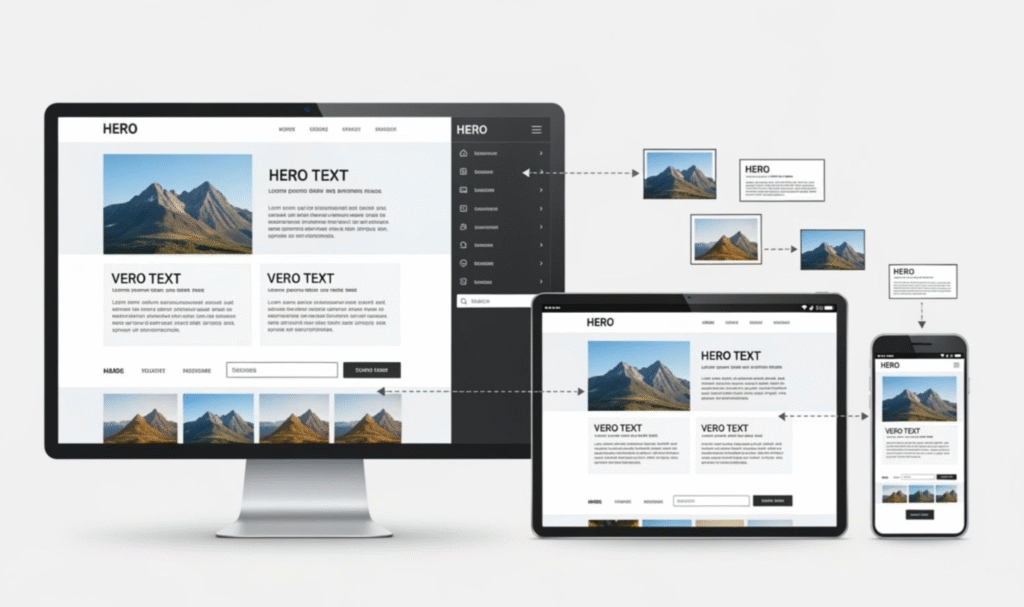
Responsive web design allows layouts and content to adapt to different screen sizes and capabilities.
Developers use flexible layouts, media queries, responsive images, and appropriate interaction patterns for smartphones, tablets, and desktops.
Mobile-first design generally begins with smaller-screen requirements before enhancing layouts for larger screens.
For many public websites, this helps prioritize essential content and interactions.
However, highly specialized applications may require a different design strategy based on their actual users and devices.
Why Website Architecture Matters
Information architecture connects content structure with user needs.
A clear sitemap, logical URL hierarchy, useful navigation, and contextual internal links make information easier to find.
These decisions also support search-engine discovery.
User Need + Content Structure → Information Architecture
CMS Development and Content Management
A content management system (CMS) allows authorized users to create, edit, organize, and publish website content without manually editing code for every change.
Common CMS functionality includes page management, media libraries, publishing workflows, content permissions, and administrative dashboards.
Traditional CMS vs. Headless CMS
A traditional CMS typically connects content management and page presentation more closely.
A headless CMS separates content management from the presentation layer, allowing websites or applications to retrieve content through APIs.
Headless architecture may help when content must serve multiple digital channels, but it can introduce additional development and maintenance complexity.
The better choice depends on the publishing workflow and technical requirements.
WordPress Web Development
WordPress is a widely used CMS that supports themes, plugins, custom functionality, and visual page-building tools.
WooCommerce extends WordPress with ecommerce capabilities.
Businesses may choose WordPress for its content-editing environment and flexible ecosystem.
However, implementation quality depends on hosting, architecture, plugin selection, configuration, updates, security, and performance management.
WordPress is neither automatically the simplest nor the strongest choice for every project.
Ecommerce Web Development
Ecommerce development focuses on websites that support online purchasing.
Core features may include:
- Product and category pages
- Product search and filtering
- Shopping carts
- Checkout and payment integration
- Inventory management
- Order processing
- Shipping integrations
- Customer accounts
Platforms such as Shopify and WooCommerce provide foundations for different ecommerce requirements.
A successful buying experience also depends on clear product content, transparent pricing and delivery information, trust signals, intuitive navigation, and usable checkout flows.
Technology + UX + Trust + Product Content + Conversion
Technical functionality enables transactions, but the full customer experience influences whether someone completes a purchase.
Read Also: Landing Page vs Website: Key Differences Explained
Website Performance and Core Web Vitals
Website performance describes how efficiently a website loads, responds to interactions, and maintains visual stability.
Slow loading, delayed responses, and shifting page elements can make a website frustrating to use.
Performance optimization may involve:
- Compressing and properly sizing images
- Efficiently delivering CSS and JavaScript
- Reducing unnecessary third-party scripts
- Implementing caching
- Using a content delivery network (CDN)
- Improving server response
- Prioritizing important content
What Are Core Web Vitals?
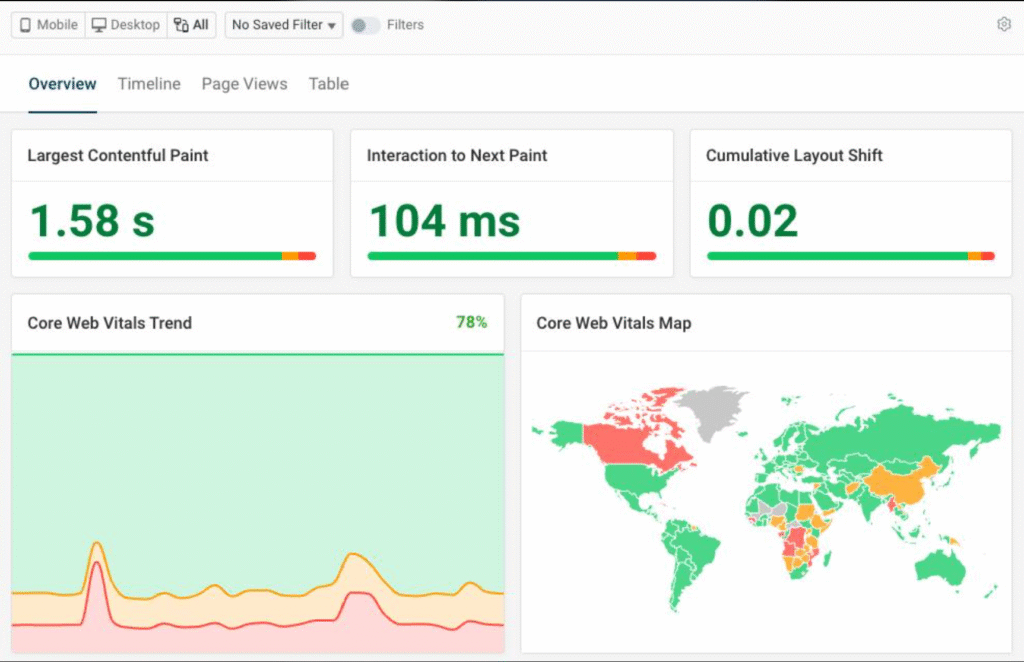
Core Web Vitals are Google-defined metrics that evaluate important aspects of real-world page experience.
According to Google’s Web Vitals documentation, the current recommended thresholds are:
| Metric | What It Measures | Good Threshold |
| Largest Contentful Paint (LCP) | Loading performance of the largest visible content element | 2.5 seconds or less |
| Interaction to Next Paint (INP) | Responsiveness to user interactions | 200 milliseconds or less |
| Cumulative Layout Shift (CLS) | Unexpected visual movement | 0.1 or less |
These thresholds are evaluated at the 75th percentile of page loads, with mobile and desktop results considered separately.
Tools such as PageSpeed Insights, Chrome DevTools, and Search Console can help identify performance issues.
Better Performance → Lower Friction → Better User Experience
Performance improvements can support business objectives, but do not guarantee higher search rankings, conversion rates, or revenue.
Technical SEO and Web Development
Technical SEO helps search engines discover, access, understand, and potentially index website content.
Development decisions influence this process.
Important technical SEO considerations include:
- Crawlable navigation and internal links
- Logical URL structures
- Appropriate indexing controls
- Canonical URLs
- XML sitemaps
- Robots.txt configuration
- Descriptive metadata
- Structured data implementation
- Mobile usability
- HTTPS
- JavaScript rendering
- Performance
For JavaScript-heavy websites, developers should ensure important content and links can be accessed by search engines.
Google’s JavaScript SEO documentation explains how crawling, rendering, and indexing work for JavaScript-powered pages.
Technical SEO should be considered during architecture and development rather than treated only as a post-launch activity.
Website Architecture + Technical Implementation + Content → Search Discoverability
However, discoverability does not guarantee rankings. Search performance also depends on relevance, content usefulness, competition, and other factors.
Website Accessibility: Building for More People
Web accessibility means designing and developing digital experiences that people with different abilities can use.
Accessible development considers people who rely on keyboards, screen readers, assistive technologies, or alternative ways of interacting with websites.
Important practices include:
- Semantic HTML
- Logical heading structures
- Meaningful alternative text
- Keyboard-accessible navigation
- Visible focus indicators
- Sufficient color contrast
- Properly labeled forms
- Clear error messages
- Accessible interactive components
The World Wide Web Consortium (W3C) publishes the Web Content Accessibility Guidelines (WCAG).
As of October 2026, WCAG 2.2 is a published W3C Recommendation, while WCAG 3.0 remains a working draft.
Accessibility is fundamentally about inclusive access and usability, not simply improving SEO.
Automated testing can identify some issues, but manual testing remains important.
Website Security and Data Protection
Websites need appropriate security practices to reduce risks to users, organizations, and stored information.
Key considerations include:
- HTTPS and TLS for encrypted connections
- Strong authentication
- Proper authorization and access controls
- Secure password handling
- Updated dependencies and software
- Security patches
- Input validation
- Malware monitoring
- Backups and recovery procedures
- Responsible data protection
HTTPS helps secure information in transit. It does not, by itself, make an entire application secure.
Security is an ongoing responsibility.
The OWASP Top 10 is a useful reference for understanding major web application security risk categories.
Testing, Quality Assurance, and Deployment
Before a website becomes publicly available, it should undergo appropriate testing.
Quality assurance (QA) may include:
- Functional testing
- Responsive and cross-browser testing
- Form and checkout testing
- API and integration testing
- Accessibility testing
- Performance testing
- Error handling
- User acceptance testing
Testing protects usability, functionality, brand credibility, and potential conversions.
How Deployment Works
Development environments allow teams to build features. A staging environment provides a place to review changes before publishing.
Production is the live environment used by actual visitors.
Development → Testing → QA → Deployment → Production
A responsible launch includes configuration checks, domain and DNS verification, functional testing, and rollback planning where appropriate.
Website Maintenance After Launch
A website is an active digital system, not a finished document.
Website maintenance may include software updates, security patches, backups, uptime monitoring, broken-link fixes, compatibility testing, content updates, and performance monitoring.
CMS-based websites also require attention to themes, plugins, and other dependencies.
Launch → Monitor → Maintain → Optimize → Improve
The maintenance plan should match the website’s complexity and operational importance.
Web Analytics and Continuous Optimization
Web analytics helps businesses understand how visitors interact with their websites.
Tools such as Google Analytics 4 (GA4), Google Search Console, and appropriately configured analytics dashboards can provide different forms of insight.
Teams may measure:
- Page views and engagement
- Traffic sources
- Form submissions
- Purchases and bookings
- Important user events
- Organic search performance
- Conversion paths
Tag management tools can help organize tracking implementations, while heatmaps or behavior-analysis tools may provide additional UX insights where appropriate.
Tracking must be implemented accurately and in accordance with relevant privacy and consent requirements.
Website → User Behavior Data → Insight → Optimization
Analytics becomes useful when insights lead to informed decisions.
How Web Development Supports Conversion
A conversion occurs when a visitor completes a meaningful action, such as submitting a lead form, booking an appointment, registering, or purchasing.
Web development supports conversion by making these actions technically possible and reducing unnecessary friction.
Important elements include:
- Clear calls to action
- Accessible forms
- Simple navigation
- Trust signals
- Useful landing pages
- Reliable checkout functionality
- Responsive interfaces
- Accurate tracking
Traffic → Experience → Action → Conversion Opportunity
However, development alone does not create conversions.
Audience quality, messaging, product-market fit, offer strength, pricing, brand credibility, and content all influence results.
A well-developed website creates the conditions for action. The complete marketing experience determines how effectively those conditions are used.
How Branding and Content Connect With Web Development
A website is often one of the clearest digital expressions of a brand.
Typography, color, visual identity, photography, motion, messaging, and interactive behavior all shape how people experience that brand.
Brand Strategy → Web Design → Web Development → Digital Brand Experience
At the same time, content gives the website meaning.
This includes service descriptions, landing page copy, product information, blogs, images, testimonials, and video.
A technically sophisticated website can still underperform when its content is unclear or generic.
Technology + Design + Content = Functional Digital Experience
Strong website delivery brings creative direction, technical implementation, and communication together.
No-Code vs. Low-Code vs. Custom Development
Not every website requires the same technical approach.
| Approach | Main Characteristic | Suitable Situations | Considerations |
| No-code | Visual tools with little manual coding | Straightforward websites and workflows | Platform constraints |
| Low-code | Visual tools plus custom technical logic | Business workflows and integrations | Platform dependencies |
| Custom development | Tailored programming and architecture | Complex applications and specialized systems | Greater development responsibility |
No-code tools can accelerate standard website creation.
Low-code platforms can help teams combine visual development with more complex functionality.
Custom development provides greater control over specific requirements, but requires suitable expertise and maintenance planning.
Flexibility, performance, scalability, integrations, ongoing cost, and platform dependency should all influence the decision.
AI and the Future of Web Development
Artificial intelligence is changing how parts of the development process are performed.
AI-assisted tools can support code completion, prototype generation, debugging, test drafting, documentation, content assistance, and design exploration.
AI website builders may also help users create initial layouts and websites through visual or conversational workflows.
These capabilities can accelerate some tasks, but generated output still requires appropriate review.
Developers must consider architecture, maintainability, privacy, security, accessibility, licensing, integration requirements, and functional accuracy.
AI-generated code is not automatically production-ready.
The practical opportunity is to use AI to support human expertise while retaining technical judgment and accountability.
Examples of Web Development Projects
Web development projects vary substantially according to their business objectives.
| Business Goal | Website Type | Core Functionality | Development Requirements |
| Generate local enquiries | Service business website | Service pages, contact forms | Mobile UX, local SEO, tracking |
| Sell products | Ecommerce website | Catalog, cart, checkout | Payment and inventory integration |
| Deliver software | SaaS application | Accounts, dashboards | Authentication, APIs, database |
| Increase restaurant bookings | Restaurant website | Menu, location, booking | Reservation integration, responsive UX |
| Generate B2B leads | Corporate website | Case studies, forms | CMS, CRM integration, analytics |
| Manage member access | Membership portal | Accounts, restricted content | Authorization, subscriptions |
| Support internal operations | Web dashboard | Reports, workflow controls | Secure data integration |
Aspiring developers can build smaller versions of these experiences as portfolio projects.
Useful practice projects include a responsive portfolio, task manager, ecommerce prototype, booking interface, or API-powered dashboard.
Tutorial projects help demonstrate learning, but production environments also require real-world testing, security, collaboration, and maintenance.
Common Web Development Mistakes to Avoid
Many website problems begin with decisions made before development starts.
| Mistake | Why It Matters |
| Starting without defined requirements | Creates confusion and rework |
| Prioritizing visuals over usability | Makes important tasks harder |
| Ignoring mobile users | Creates friction on smaller screens |
| Weak information architecture | Makes content difficult to discover |
| Ignoring accessibility | Excludes some users |
| Excessive scripts and plugins | Can increase complexity and performance costs |
| Neglecting testing | Allows defects into production |
| Weak security practices | Increases operational risks |
| Ignoring technical SEO | Can create search-discovery problems |
| Overengineering simple requirements | Increases cost and maintenance effort |
| Choosing tools only because they are trending | Creates unnecessary technical constraints |
| Launching without analytics or maintenance | Limits improvement and long-term reliability |
One of the most important principles is to build around actual requirements rather than adding complexity for its own sake.
What Are the Career Paths in Web Development?
Web development offers multiple specializations.
Common career paths include:
- Front-End Developer: Builds user-facing interfaces.
- Back-End Developer: Develops application logic, APIs, and data systems.
- Full-Stack Developer: Works across front-end and back-end systems.
- Web Application Developer: Builds interactive browser-based applications.
- CMS Developer: Customizes and extends content management systems.
- Ecommerce Developer: Implements online shopping functionality.
- DevOps Engineer: Supports infrastructure, deployment, and operations.
- QA Engineer: Tests software functionality and reliability.
- Accessibility Specialist: Evaluates and improves inclusive interfaces.
- Web Performance Engineer: Investigates and optimizes performance.
- Technical Lead: Guides architecture and development decisions.
- Engineering Manager: Supports teams, delivery, and technical execution.
Related roles include UI designer, UX designer, product manager, and technical SEO specialist.
The right career depends on whether someone prefers visual interfaces, software logic, data, infrastructure, or multidisciplinary problem-solving.
What Do Web Development Services Include?
Professional web development services may cover the complete website lifecycle or a specific technical requirement.
Common services include website strategy, UX research, UI design, front-end development, back-end development, CMS setup, ecommerce development, API integrations, migration, performance optimization, technical SEO implementation, analytics, and maintenance.
Some providers specialize in only one area, while others offer multidisciplinary services.
Before beginning a project, businesses should understand exactly what is included in the agreed scope.
Web Development Agency vs. Freelancer vs. In-House Team
Different delivery models offer different advantages.
| Option | Potential Advantages | Considerations |
| Web development agency | Multidisciplinary expertise, coordinated delivery, project management | Scope, cost, communication structure |
| Freelancer | Direct collaboration, flexibility, focused expertise | Capacity, coverage, continuity |
| In-house team | Organizational knowledge, ongoing availability, direct ownership | Recruitment, management, specialist coverage |
A freelancer may be suitable for a focused website update.
An agency may be useful when a project requires coordinated strategy, design, development, content, and QA.
An in-house team may be appropriate when web technology is central to daily operations and long-term product development.
No approach is universally superior.
How to Choose a Web Development Agency
When evaluating a web development agency, look beyond visual examples of completed websites.
Ask about:
- Relevant experience: Has the team handled similar website requirements?
- Strategy and UX: How are audience needs and user journeys considered?
- Technical approach: Why is the proposed technology suitable?
- Performance and accessibility: How are these tested?
- SEO implementation: Are technical search requirements considered?
- Security: How are updates, access, and data protection managed?
- Quality assurance: What happens before launch?
- Communication: Who manages feedback, approvals, and delivery?
- Ownership: Who controls domains, code, accounts, and assets?
- Documentation: What information is provided at handoff?
- Support: What happens after the website goes live?
A strong proposal should connect recommendations to business requirements rather than simply listing technologies.
What Affects Web Development Costs?
Website development costs depend on scope and complexity.
Important factors include page count, custom design, CMS requirements, ecommerce functionality, user accounts, APIs, content migration, copywriting, accessibility needs, performance requirements, testing, and ongoing maintenance.
A straightforward content website and a custom SaaS application have fundamentally different development needs.
The most useful estimate is based on a documented scope rather than a universal website price.
Web Development at TUMA
At TUMA, we believe a website should do more than exist.
It should represent the brand clearly, support meaningful interactions, work across devices, and help visitors move toward their goals.
That means connecting website strategy with UX, design, development, content, technical SEO, and performance.
A good example is TUMA’s EnspireShip website project, which combined website strategy and UI/UX development with an automated ticket-generation experience.
The focus was not simply on creating pages, but on building an experience that supports how the organization operates.
TUMA’s broader capabilities in branding, content creation, social media marketing, video, and creative strategy also inform how websites fit into the customer journey.
Because the most effective digital experiences do not treat design, technology, and marketing as separate conversations.
Marketing should deliver results.
For businesses exploring a new website or improving an existing one, discover TUMA’s web development services.
Web Development Is More Than Building a Website
Web development connects technology with how people discover, understand, and interact with digital products.
It involves front-end interfaces, back-end functionality, databases, integrations, content systems, security, accessibility, performance, and ongoing maintenance.
For aspiring developers, learning these foundations creates opportunities to build practical skills and specialize.
For business owners, understanding web development makes it easier to plan realistic projects, communicate requirements, and evaluate technical decisions.
The central principle is simple:
A successful website is not defined by how much technology it uses, but by how effectively that technology supports users and business goals.
Build with purpose. Test with care. Improve with evidence.
That is what good web development looks like.